Split a monday.com account: move part of it and leave the rest
monday.com copies a folder of boards to another account. A split needs more: decide what leaves, what stays, and what both sides still touch.
monday.com's own article says its Cross Account Copier "works by copying a folder containing Main boards and dashboards to another account" (read 19 Nov 2026). TaskRhino, a certified monday.com partner, plans a split and runs it with RhinoMove, its tool for moving, merging and splitting accounts, with a signed integrity report at the end. Draw the cut line first.
Links to boards that stay behind become empty or text; mirrors become text.
Tap to choose
The cut line: what crosses it?
Seven questions, about a minute. Tap each one that applies. See also the copier check for a single folder of boards. You get a cut list: what to decide, who decides, and the monday.com fact it comes from with the date it was read.
How each answer is decided (sources)
Each answer to the questions above and what it means
Question
If you answer
What it means
Weight
Does a board that leaves link to a board that stays, or the other way round?
Yes
Links to boards outside the split become empty or text, and mirrors on split boards become text, so list each one in your cut list. monday.com's own copier hides a Connect Boards column on the destination unless the linked board is in the same folder (monday.com support, read 19 Nov 2026). Who decides: both sides, one link at a time.
Settle this
Does a board that leaves link to a board that stays, or the other way round?
Not sure
Find out before the cut line is drawn, then answer again: it decides what you must settle.
Settle this
Are any of the unit's boards private or shareable?
Yes
monday.com's own copier does not transfer shareable or private boards (monday.com support, read 19 Nov 2026). Name them in your cut list; the call settles how they move. Who decides: the seller, with the buyer saying what it wants.
Settle this
Are any of the unit's boards private or shareable?
Not sure
Find out before the cut line is drawn, then answer again: it decides what you must settle.
Settle this
Do people work on both sides of the line?
Yes
The same email address can be used in different accounts (monday.com support, read 19 Nov 2026), so a person can sit on both sides. Assignees, subscribers and updates carry only for people who are already in the destination account with the same email. Who decides: both sides, person by person.
Settle this
Do people work on both sides of the line?
Not sure
Find out before the cut line is drawn, then answer again: it decides what you must settle.
Settle this
Are there guests on the unit's boards?
Yes
Guests are listed for re-invite; they are not matched like members. Decide who re-invites each guest, and into which account. Who decides: the account owner on each side.
Settle this
Are there guests on the unit's boards?
Not sure
Find out before the cut line is drawn, then answer again: it decides what you must settle.
Settle this
Does any automation or integration touch boards on both sides?
Yes
monday.com's copier keeps cross-board automations working only inside the same moved folder, and automations that include integrations do not carry over (monday.com support, read 19 Nov 2026). RhinoMove lists what it cannot move in its report. Who decides: both sides.
Settle this
Does any automation or integration touch boards on both sides?
Not sure
Find out before the cut line is drawn, then answer again: it decides what you must settle.
Settle this
Do people outside use the unit's forms through share links?
Yes
Form share links are new after a copy: the new board has a new link, and the form link has to be recreated (monday.com support, read 19 Nov 2026). Tell everyone who uses the old links. Who decides: the seller, before the move.
Settle this
Do people outside use the unit's forms through share links?
Not sure
Find out before the cut line is drawn, then answer again: it decides what you must settle.
Settle this
Are there very large files or link files?
Yes
Link files and files over 500 MB are listed, not copied. Decide how the listed files reach the other side. Who decides: the seller lists them, the buyer confirms.
Settle this
Are there very large files or link files?
Not sure
Find out before the cut line is drawn, then answer again: it decides what you must settle.
Settle this
Sources: monday.com support (the copy-boards and switch-accounts articles). Checked 19 Nov 2026.
What monday.com offers for a split
monday.com's own tool is the Cross Account Copier. It copies a folder of Main boards and dashboards to another account, in the same region. Its article (read 19 Nov 2026) lists the conditions, and one of them is that the person doing it is admin on both accounts with the same email address.
In a sale that is often the first problem: the seller's admin and the buyer's admin are different people at different companies. That is our reading of monday.com's condition, to confirm with monday.com for your case.
Move only part of an account: pick the workspaces, folders or boards, leave out items by a column value, or split one board into several by a status or other column.
Leaves
Folder: Unit sales
Folder: Unit delivery
Stays
Folder: Group finance
Folder: Group legal
Both touch
Board: Shared customer list
People: two finance staff
Example, labeled: your own lists come from the cut line above. The shared customer list is the usual hard one: it either leaves, stays, or is copied so that both sides have one.
monday.com says a board linked by a Connect Boards column has to go in the same folder, or the column is hidden on the destination and the copier warns that data from boards that are not included will be missing (monday.com support, read 19 Nov 2026). Cross-board automations keep working only inside the same moved folder.
For RhinoMove:links to boards outside the split become empty or text, and mirrors on split boards become text. List them in your cut list. Links from other boards into a board you split point at the right boards.
A split of one board by status into six boards, with links and subitems correct, was tested end to end on a monday.com API simulator. Accounts for 41 documented monday.com API limits and quirks, from daily call limits to file links that expire after an hour. Where monday.com's API cannot do something, RhinoMove lists it in the report instead of failing quietly.
The same email address can be used in different accounts (monday.com support, read 19 Nov 2026), so a person can have an account on each side. For assignments, monday.com carries them only for people in the destination account with the same email.
Your old account's data is only read, never changed: the code refuses any write to it, and a test checks that. The one thing RhinoMove adds there is a temporary webhook (a change notice) on the boards it is syncing, which it removes at go-live.
What the parent does afterwards, for example archiving the boards that left, is your own step. We do not do it for you.
Built to follow monday.com's Developer Terms: it never rotates IP addresses or tokens to get around limits, and staged copies of your data are deleted by default 21 days after go-live (never more than 29 days without your written consent). The integrity report and audit log are kept.
monday.com has not confirmed this in writing.
Deletion
A signed certificate
When your data is deleted you get a signed deletion certificate that anyone can verify from its JSON.
Encryption
Staged copies
Staged record copies and files are encrypted per project.
Each move ends with a signed integrity report, and when your data is deleted you get a signed deletion certificate. Both carry a digital signature (Ed25519) that anyone can check against RhinoMove's public key.
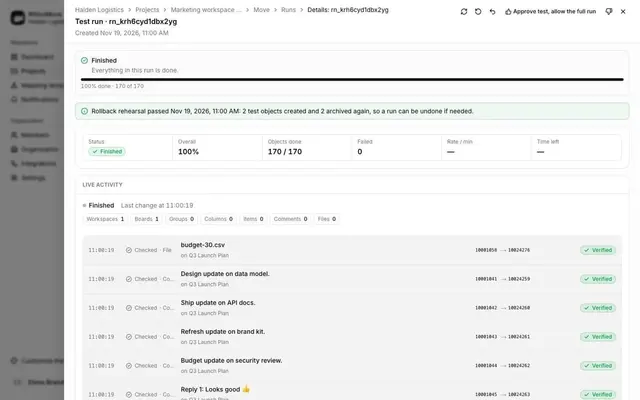
Counts: from RhinoMove's own map of every copied object (a full recount of both accounts is a command-line tool, not a screen).
In RhinoMove's own tests, "full run: 1,447 objects verified, 0 failed (tests on a monday.com API simulator, 24-25 Oct 2026)".
Your size-check answers are already in the message. Change anything you like.
Questions people ask about splitting a monday.com account
Direct answers with sources and read dates. General information, not legal advice. Security terms by plan: monday.com security and compliance.
Can I split a monday.com account?
monday.com's help pages describe copying a folder of Main boards and dashboards to another account, not splitting one, and say there is no direct workspace transfer feature. A larger split needs a cut line: what leaves, what stays, and what both sides touch.
Can I copy only one department's boards to a new account?
Yes: the Cross Account Copier copies a folder containing Main boards and dashboards to another account (monday.com support, read 19 Nov 2026). Private and shareable boards are not transferred.
What happens to boards linked to boards that stay?
With RhinoMove, links to boards outside the split become empty or text, and mirrors on split boards become text, so you list them in the cut line. monday.com's copier hides the column unless the linked board is in the same folder.
Who needs to be admin on both accounts?
For monday.com's own copier, one person who is admin on both accounts with the same email address (monday.com support, read 19 Nov 2026). In a sale, that person has to be agreed before anything moves.
Do people on both sides need both accounts?
Not necessarily: one email can be used in different accounts (monday.com support, read 19 Nov 2026), so each side decides who needs which account.
Does the parent account change?
RhinoMove only reads the old account and adds a temporary webhook on the boards it is syncing, which it removes at go-live. What the parent does with the boards that left is your own step.
What stays on your side after the move?
Staged copies of your data are removed on a set schedule after go-live, and the report and audit log stay. The full wording follows: Built to follow monday.com's Developer Terms: it never rotates IP addresses or tokens to get around limits, and staged copies of your data are deleted by default 21 days after go-live (never more than 29 days without your written consent). The integrity report and audit log are kept. monday.com has not confirmed this in writing.