

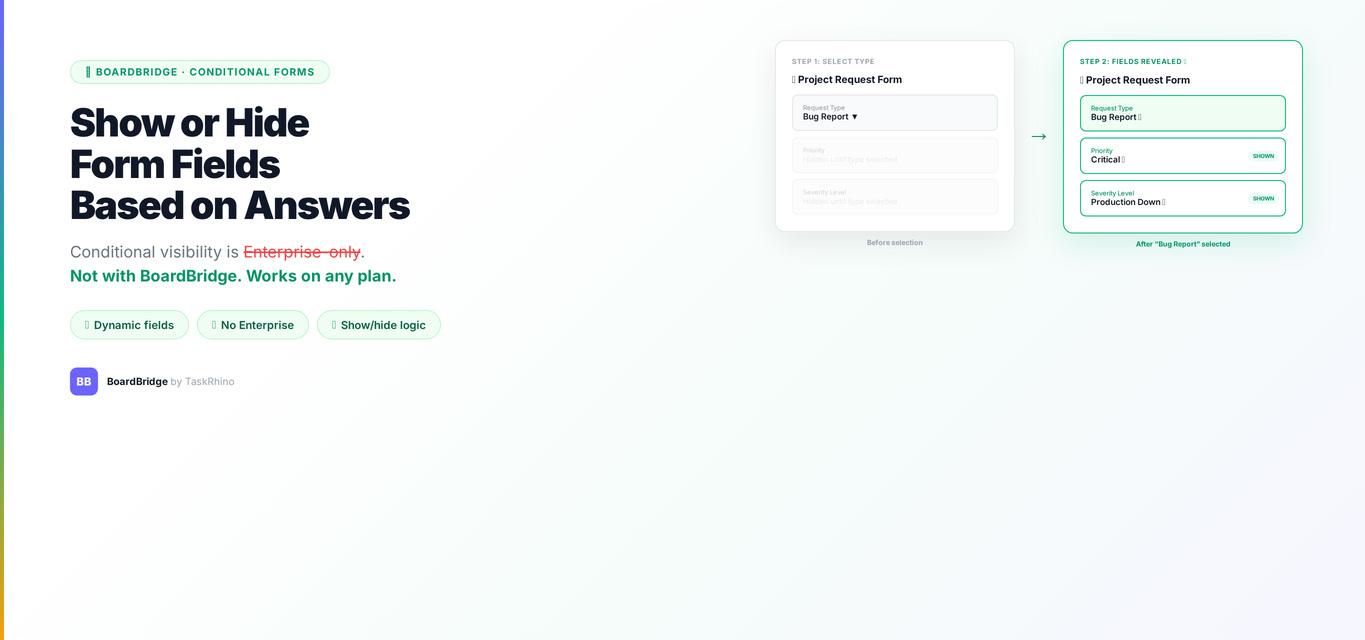
How to Show or Hide monday.com Form Fields Based on Previous Answers
Content track: BoardBridge Product CTA: Book a free demo
If you’ve built a monday.com form with more than a handful of questions, you’ve probably noticed the problem: everyone sees everything. A respondent selects “No, I don’t need travel arrangements” and still has to scroll past five travel-related questions that don’t apply to them. A new hire form asks about dietary restrictions even when the respondent ticked “Not attending the in-person event.” It’s a clunky experience — and it leads to confusion, incomplete submissions, and data you can’t trust.
The feature you need is conditional logic — the ability to show or hide form fields based on how someone answered a previous question. And monday.com does have this feature. Sort of. On some plans. With some caveats that matter a lot in practice.
This guide covers exactly what monday.com’s native conditional logic can do, where it falls short, and what your options are when the native feature doesn’t cut it.
In this post:
- What conditional logic in forms actually means
- What monday.com WorkForms can do natively (and the plan requirements)
- Step-by-step: setting up conditional display in WorkForms
- The limitations nobody warns you about upfront
- Options when native conditional logic isn’t enough
- FAQ
What “Show/Hide Fields Based on Answers” Actually Means
Conditional logic (also called branching, skip logic, or display conditions) lets a form show or hide questions based on a respondent’s previous answers. The result is a form that feels shorter and more relevant — respondents only see questions that apply to their situation.
A few examples of what this looks like in practice:
- Question 2 asks “Will you need accommodations?” → if the answer is “No,” the next five lodging questions stay hidden
- A project intake form asks “What type of request is this?” → if someone selects “Bug fix,” they see a different set of follow-up questions than if they select “New feature”
- A vendor onboarding form asks “Do you have a signed NDA on file?” → if “No,” it reveals a section asking them to upload one
This is standard functionality in tools like Typeform, JotForm, and Google Forms. In monday.com, it’s more complicated.
What monday.com WorkForms Can Do Natively
Monday.com added conditional logic to WorkForms in late 2025 (Source). Before that, the platform had no branching at all — every respondent saw every question, regardless of their answers. That was a long-standing frustration: the original feature request for conditional logic in WorkForms was posted in August 2019 and spent years gathering votes without resolution.
The feature is now available, with availability and depth varying by plan. It operates at the section level (Source). Field-level control availability depends on your specific plan.
Here’s what that means practically:
- You can group questions into sections and show or hide an entire section based on a previous answer
- You cannot show or hide an individual field within a section without also affecting the other fields in that section
- Conditions are based on one answer at a time — there’s no compound AND/OR logic (“show this section IF answer A equals X AND answer B equals Y”)
- The logic only references form answers — it cannot branch based on existing board data or column values
Plan requirements for native conditional logic in WorkForms:
| Feature | Standard | Pro | Enterprise |
|---|---|---|---|
| Conditional logic (show/hide sections) | ✗ | ✗ | ✓ |
| Field-level show/hide | ✗ | ✗ | ✗ |
| Compound AND/OR conditions | ✗ | ✗ | ✗ |
| Conditional logic based on board data | ✗ | ✗ | ✗ |
If you’re on Standard or Pro, the native conditional logic feature simply isn’t available. You can read about it in the docs, but you won’t find it in your form builder.
Stop Creating Duplicates
BoardBridge forms update existing items — no Enterprise plan, no workarounds, no duplicates.
How to Set Up Conditional Display in WorkForms (Enterprise)
If you’re on Enterprise, here’s how to get conditional display working:
Step 1: Open your form builder Go to your board → click the form view → select “Edit Form.”
Step 2: Organize your questions into sections Conditional logic in WorkForms works at the section level. Group related questions that should appear together into named sections. For example: a “Travel Arrangements” section containing all travel-related questions, a “Remote Participation” section for respondents who won’t be attending in person.
Step 3: Add a trigger question The conditional display is driven by a specific question’s answer. Create or identify the question that will control what sections appear — for example, “Will you be attending in person?” with options “Yes” and “No.”
Step 4: Set display conditions on sections Click on the section you want to conditionally show or hide → look for the display conditions setting → set the rule. For example: “Show this section ONLY IF Question 1 equals ‘Yes’.”
Step 5: Preview and test Use the form preview to cycle through different answer combinations. Verify that sections appear and disappear as expected. Test edge cases — what happens if someone doesn’t answer the trigger question?
Pro tip: Make sure the trigger question comes before the conditional section in the form. WorkForms evaluates conditions top-to-bottom, so a section can only branch on answers from questions that appear earlier in the form.
What Most Guides Don’t Tell You: The Real Limitations
The native feature works — but there are some important constraints that aren’t obvious until you’re already mid-build.
It’s section-level, not field-level
This is the biggest one. You can’t show or hide a single field. You show or hide an entire section. If you need one question out of a six-question section to be conditional, you have to split that section apart — which can disrupt the visual flow of your form.
In practice, this pushes people to create a lot of single-question sections just to get field-level control. That works, but it makes the form builder harder to manage and the form itself can feel choppy.
Required fields don’t respect hidden sections
This one catches a lot of people. If a field is marked as required and its section gets hidden by conditional logic, the required validation still fires. The respondent can’t submit the form even though the question isn’t visible.
The workaround is to remove the “required” setting from any field that might be hidden by conditions. But that means a field is only required when it’s visible — and there’s no way to enforce that automatically in WorkForms. You have to manage it manually, and it’s easy to miss.
No AND/OR compound logic
You can set one condition per section (“show this section IF answer A equals X”). You can’t set compound rules (“show this section IF answer A equals X AND answer B equals Y”). For simple branching that’s fine. For anything more nuanced — multi-path intake forms, tiered screening logic — it’s not enough.
It’s Enterprise-only — full stop
This isn’t a gradual rollout or a “coming soon to Pro” situation. As of early 2026, conditional logic is an Enterprise-exclusive feature, confirmed by both monday.com’s official documentation and independent plan comparison analysis. If you’re on Standard or Pro, you can’t access it regardless of how long you’ve been a customer or how much you pay.
The community frustration here is real. From the forum thread that started in 2019:
“Forms can’t apply conditions using live data from other boards, such as pulling information from mirror columns and connect boards.”
And as recently as January 2026, Pro users were still asking when the feature would reach their plan — with no committed timeline from monday.com.
See How BoardBridge Handles Form Updates
Book a free demo to see BoardBridge solve this exact problem — live, with your data.
Going Beyond Native: Options When WorkForms Isn’t Enough
If you’re on Standard or Pro and need conditional logic, or if you’re on Enterprise but need field-level control or AND/OR logic, you’re looking at third-party solutions. Here’s how the main options stack up:
BoardBridge — Form & Workflow Automation for monday.com
BoardBridge is the option we built specifically for this problem. The Forms Engine in BoardBridge supports conditional logic on any monday.com plan — Standard, Pro, or Enterprise — and it works at the field level, not the section level.
How it works: when building a form in BoardBridge, you set display conditions directly on each individual field. You can use AND/OR logic, choose from five comparison operators (equals, not equals, contains, greater than, less than), and chain multiple conditions together.
A few things it handles that WorkForms doesn’t:
- Show or hide a single field based on a previous answer — no section restructuring needed
- Compound conditions: “show this field IF answer A equals X AND answer B equals Y”
- Required field validation that respects hidden fields — hidden fields are excluded from validation automatically
- Field-level conditions across all 10 supported field types (text, dropdown, checkbox, number, date, email, phone, file, location, long text)
BoardBridge forms also update existing monday.com items rather than creating new ones — which is a separate limitation in WorkForms — and support custom branding, multi-layout options (wizard, single page, tabs, accordion), and automatic redirect after submission.
Key takeaway: If you need conditional logic and you’re not on Enterprise — or if you’re on Enterprise but need field-level control or compound AND/OR rules — BoardBridge fills that gap without requiring a plan upgrade.
Fillout
Fillout integrates with monday.com and offers conditional logic on its free tier (up to 1,000 submissions/month). It’s a standalone form builder rather than a native monday.com extension, which means it has its own interface and URL — not embedded in your monday.com workspace. Good for simple conditional forms when volume is low and you don’t need deep board integration.
SuperForm by Spot-nik
SuperForm is the most-installed form app in the monday.com marketplace (10,000+ installs). It offers conditional logic across all plans and supports some column types that WorkForms doesn’t. It’s priced at $35–$520/month depending on your workspace size. Worth considering if you’re already using it for other reasons (like Connect Boards or Mirror column support in forms).
Real-World Example: Vendor Onboarding Form
A professional services team used monday.com WorkForms to collect information from new vendors. The form had 24 questions — but depending on vendor type, only 10–14 were ever relevant to any given vendor.
The team was on Pro plan, so native conditional logic wasn’t available. Every vendor saw all 24 questions. Completion rates were low. The team was getting partial submissions and spending time chasing vendors for answers to questions they’d left blank.
They switched the onboarding form to BoardBridge. The new form:
- Asks vendor type up front (five options)
- Shows only the relevant follow-up questions for each type
- Uses a “wizard” layout — one section at a time — with a progress bar
- Marks the form as submitted and updates the vendor’s status column on the board automatically
Completion rates improved significantly. And since the form updates the existing vendor item (rather than creating a new one), the board stayed clean — no duplicates, no manual merging.
Need Help With Your monday.com Setup?
TaskRhino has implemented monday.com for 110+ teams. Get a free consultation.
Frequently Asked Questions
Does monday.com WorkForms have conditional logic?
Yes, but only on the Enterprise plan, and only at the section level. You can show or hide entire sections of a form based on a previous answer. You cannot show or hide individual fields, and there is no compound AND/OR logic available natively.
Can I show or hide a single question in a monday.com form?
Not natively. WorkForms conditional logic works at the section level — you show or hide groups of questions together. To show or hide a single question, you’d need to place it in its own section (which affects form layout) or use a third-party tool that supports field-level conditional logic, like BoardBridge.
Is conditional logic available on monday.com Pro?
No. As of early 2026, conditional logic in WorkForms is an Enterprise-only feature. Standard and Pro plan users don’t have access to it in the native form builder.
What happens to required fields inside a hidden section?
They still trigger. This is a known issue: if a field is marked required and its section is hidden by conditional logic, monday.com’s validation will still prevent form submission. The workaround is to remove the required setting from any fields that might be conditionally hidden — but this requires manual management and is easy to miss.
Can I use conditional logic in monday.com forms without Enterprise?
Yes — through third-party tools. BoardBridge offers field-level conditional logic with AND/OR support on any monday.com plan. Fillout also supports conditional logic on its free tier. Monday.com’s native conditional logic is a step forward, but it’s gated behind Enterprise and limited to section-level control. If you’re on Standard or Pro — or if you need field-level show/hide, compound conditions, or logic that doesn’t create problems with required field validation — you’re going to need to look outside WorkForms. BoardBridge by TaskRhino handles all of this out of the box, on any monday.com plan. If you want to see how field-level conditional logic works in practice, book a free demo and we’ll show you a working example with your board setup in mind. *Posted by TaskRhino — certified monday.com consulting partner. Questions about your monday.com setup? Book a free 30-minute consultation.*

Editor's Choice
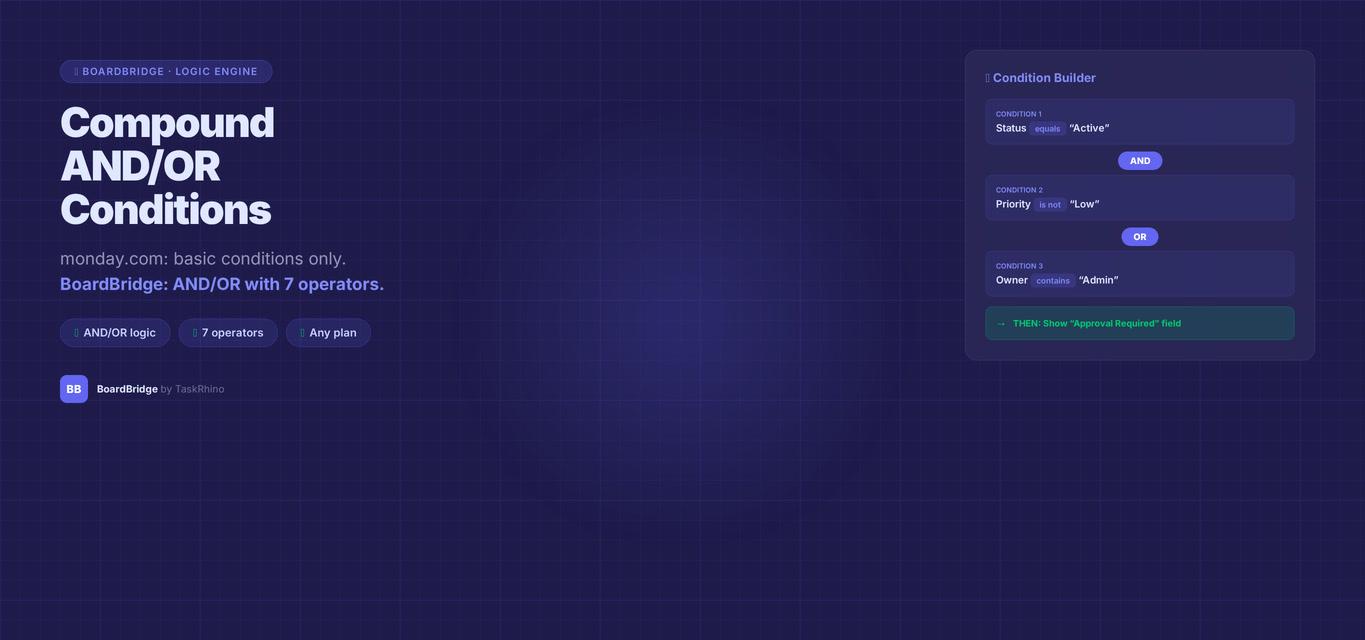
monday.com Form Compound AND/OR Conditions — Multi-Rule Logic


monday.com Form Write to Different Boards — How to Do It
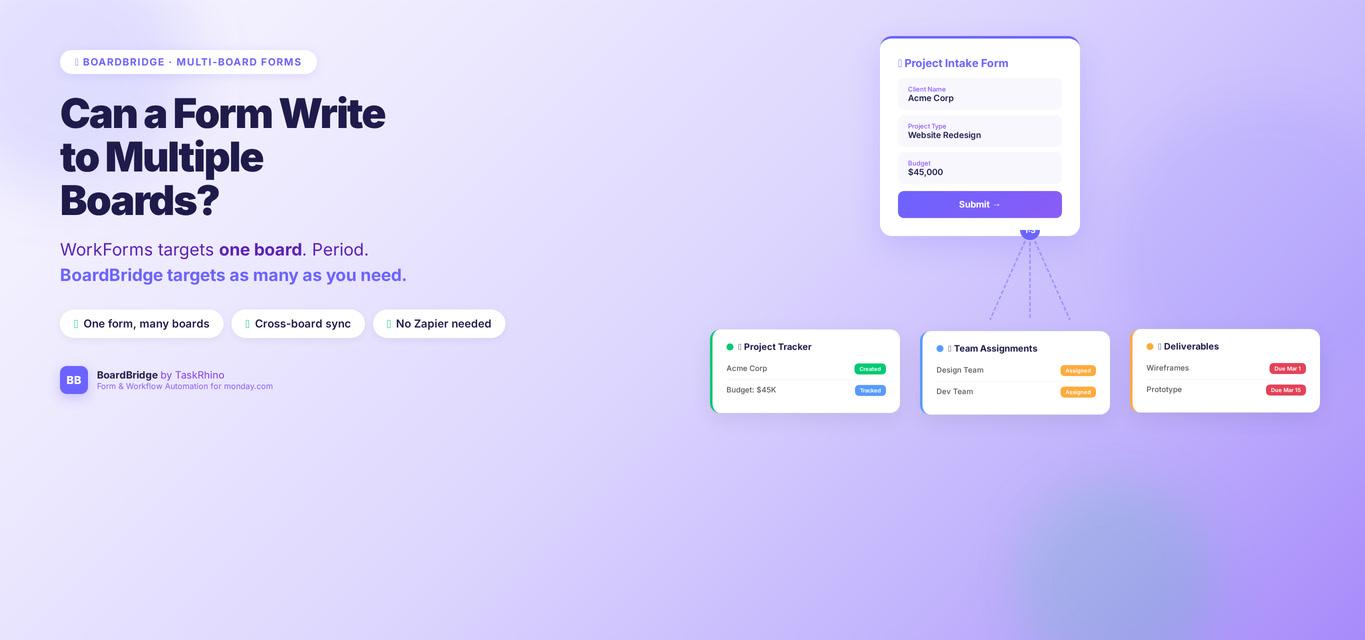
Can a monday.com Form Write to Multiple Boards? WorkForms Cannot — But This Can