

7 Best Open Source Salesforce Alternatives for Growing Businesses
We implement Twenty CRM, ranked first here, and we're a monday.com partner. Here's how we compared these CRMs fairly, and where Twenty falls short.
Twenty is our pick for teams leaving Salesforce that want a modern, API-first CRM they can host themselves; SuiteCRM, Odoo and ERPNext win when you need more built in.
Open source fits if
- Per-seat licenses are your biggest CRM cost
- You want your customer data on your own servers
- Your team or a partner can run a server
Stay on Salesforce if

- You rely on AppExchange apps, CPQ or industry clouds
- Your sales process lives in Apex code
- No one can own upgrades and backups
Starting prices
- Twenty, self-hosted (AGPLv3) Free
- Odoo Community, self-hosted (LGPLv3) Free
- Twenty Cloud Pro $9
- Salesforce Starter Suite $25


All seven are open source and free to self-host. Odoo’s paid plans and its One App Free plan run Odoo Enterprise, which is not open source. Cloud prices per user per month, billed yearly (USD). Checked on Nov 11, 2026. Work out your team’s cost
What brings you here?
Pick one and your answer shows below.
Salesforce costs too much:
Salesforce Core is $195 per user per month, billed annually, so 50 users pay $117,000 a year in licenses. The open-source editions you host yourself have no license fee, though some features are paid, such as Twenty’s SSO. Twenty’s cloud starts at $9 per user per month.
Cost for your team sizeThe costs a Salesforce quote leaves out
Planning the move off Salesforce:
Your records come out as CSV files through Salesforce’s Data Export Service. Flows, reports and permissions are rebuilt in the new CRM; formula fields and Apex code cannot move. The length depends on your data and customization, so plan it after an audit.
What moving off Salesforce takesSalesforce to Twenty CRM migration
A technical team that wants to self-host:
Twenty suits teams that want a modern, API-first CRM (AGPLv3, REST and GraphQL). SuiteCRM has the widest set of built-in CRM modules. Odoo and ERPNext fit when a sale must flow into stock, invoices and accounting.
A small business on a small budget:
Odoo Community is free and includes the CRM app, and Odoo’s One App Free plan runs one app, such as CRM, for unlimited users on Odoo Online. EspoCRM and Dolibarr run on a small server, and DoliCloud hosts Dolibarr from €14 per user per month.

Salesforce still leads the CRM market (#1 for the 13th year in IDC’s 2025 ranking); in our experience the bill is the most common reason teams start looking. Each project below was checked against its own website, documentation and code repository in November 2026: license, hosting, prices and how actively it is maintained. The order is not a score (how we compared).
The 7 at a Glance
| Platform | Open source and free to self-host? | Price (self-hosted · cloud) | Latest release |
|---|---|---|---|
| Twenty | Yes: AGPLv3 core; SSO and audit logs are paid | Free · cloud from $9/user/mo | v2.57, Nov 2026 |
| SuiteCRM | Yes: AGPLv3 | Free · hosting from £50/mo plus support | 8.10.2 and 7.15.2, Jul 2026 |
| Odoo | Odoo Community only: LGPLv3, CRM app included. Odoo Enterprise (every paid plan) is not open source | Free (Community) · Enterprise from CAD 44/user/mo | Odoo 20, Sep 2026 |
| ERPNext | Yes: GPLv3 | Free · cloud from $5/mo a site | v16.54, Nov 2026 |
| EspoCRM | Yes: AGPLv3 core; workflow and quote add-ons are paid | Free · cloud from $15/user/mo (3 minimum) | 10.1, Nov 2026 |
| Dolibarr | Yes: GPLv3 | Free · DoliCloud from €14/user/mo | 24.0.1, Sep 2026 |
| Corteza | Yes: Apache 2.0, the most permissive here | Free · hosting on request | 2026.9, Oct 2026 |


Licenses and releases from each project’s GitHub repository (Odoo’s release from its release notes), prices from each pricing page, checked Nov 10, 2026; Odoo showed Canadian dollars to us.
What’s built in:
| Platform | Sales pipeline | Email campaigns | Quotes and invoices | Accounting | Stock and manufacturing | Workflow builder | Custom objects | API |
|---|---|---|---|---|---|---|---|---|
| Twenty | Yes | No | No | No | No | Yes | Yes | Yes (REST and GraphQL) |
| SuiteCRM | Yes | Yes | Yes | No | No | Yes | Yes | Yes (API v8) |
| Odoo | Yes | Yes | Yes | Yes | Yes | Yes | Yes (Studio, Custom plan) | Yes (Custom plan) |
| ERPNext | Yes | Not listed | Yes | Yes | Yes | Yes | Yes | Yes (REST) |
| EspoCRM | Yes | Yes | Add-on (Sales Pack) | No | Add-on (Sales Pack, stock only) | Add-on (Advanced Pack) | Yes | Yes |
| Dolibarr | Yes | Yes | Yes | Yes | Yes | Not listed | Yes (Module Builder) | Yes |
| Corteza | Built from its CRM app | No | No | No | No | Yes | Yes | Yes (REST) |
From each project’s own feature pages, read Nov 10, 2026. Odoo’s row is its paid plans, which include all apps; Odoo Community has fewer (see Odoo below). “Not listed” means the feature page does not name it. We could not confirm official mobile apps from the projects’ own pages, except that Twenty has none.
Also looked at (each read on its own pages, Nov 11, 2026):
| Also looked at | Open source and free to self-host? | Why not in the seven |
|---|---|---|
| Frappe CRM | Yes: AGPLv3; Frappe Cloud from $5 a month per site, unlimited users | A CRM only, from ERPNext’s maker, which links to ERPNext; take it over ERPNext when you want only the CRM (Frappe CRM) |
| Krayin | Yes: MIT; Krayin’s hosting is $20 a month for unlimited users | A Laravel CRM from Webkul (24.1k GitHub stars); we read only its home page, too little to rank it (Krayin) |
| Vtiger Open Source | Yes: Vtiger Public License 1.1 (based on MPL 1.1); version 8.4.0 | A different product from Vtiger’s cloud, Vtiger says, with no release date given (Vtiger open source) |



Which One Fits Your Team?
| Choose | If |
|---|---|
| Twenty | You want a modern CRM your developers extend through its APIs |
| SuiteCRM | You want the most CRM modules, named like Salesforce’s, over a modern interface |
| Odoo | A sale must flow into invoicing, accounting and stock in one system |
| ERPNext | You make, stock or ship products, and would rather not pay per user |
| EspoCRM | A small team wants a simple CRM on a cheap server |
| Dolibarr | A freelancer or small firm wants quotes, invoices and accounting with the CRM |
| Corteza | No standard CRM fits, and you would rather build your own on low-code |
Why Teams Leave Salesforce
Two reasons decide most moves: what Salesforce costs at your size, and how hard it becomes to leave.
The cost grows faster than the use. Salesforce’s paid Sales Cloud editions start at $25 per user per month (the Free Suite costs nothing), but the editions with Premier support and AI credits cost $100 to $550. At Core’s $195, 50 users pay $117,000 a year in licenses, and $237,000 on Advanced.
| Plan | Price/User/Month (USD) | Billing |
|---|---|---|
| Free Suite | $0 | Free tier |
| Starter Suite | $25 | Monthly or annual |
| Pro Suite | $100 | Annual; Premier Support is an add-on |
| Core | $195 | Annual; Premier Success Plan included |
| Advanced | $395 | Annual; Premier Success Plan included |
| Max | $550 | Annual; Premier Success Plan included |
Prices from Salesforce’s Sales Cloud pricing page, checked Nov 11, 2026. The Standard Success Plan is included in every license; Core includes 500,000 Flex Credits for AI per org, Advanced 1 million and Max 2.75 million. Outside the US, Salesforce lists Core at £156 or €195 per user a month, billed annually. On top come storage, consultants, an admin and renewals (Enterprise and Unlimited list prices rose 6% on average on August 1, 2025, Salesforce says); see the costs a Salesforce quote leaves out.
Leaving gets harder every year. Every AppExchange app, custom object, flow and integration adds to the switching cost, Salesforce-specific skills do not carry over, and multi-year terms and renewal notice dates set when you can leave: start the evaluation well before the notice window. See Salesforce API limits for the integration side, Salesforce complexity and when your team won’t use Salesforce and why CRM projects underperform for the other reasons we hear.
Not every reader should leave: Salesforce remains a strong choice for organizations with large budgets, complex requirements and a dedicated admin team. For picks by company type, see Salesforce alternatives for SaaS companies, for startups, or every option in our Salesforce alternatives guide.
What Changed in 2025 and 2026
Jun 2025 · Twenty 1.0 workflows: workflows leave beta, with form triggers, conditions and webhooks, and custom roles. (Twenty’s release notes)
Apr 2026 · Twenty 2.0 AI agents: an apps framework, AI agents in workflows and MCP access to the workspace. (Twenty’s release notes)
Jul 2026 · EspoCRM 10 and SuiteCRM 8.10.2: EspoCRM’s new major version; SuiteCRM’s security and maintenance release for 8.10 and 7.15. (EspoCRM 10.0.0 on GitHub)
Sep 2026 · Salesforce editions and plans: Core ($195), Advanced ($395) and Max ($550) replace Enterprise and Unlimited for new buyers; existing customers keep their pricing. (Salesforce’s editions update)
Sep 2026 · Odoo 20: a pipeline switcher, lead rotation rules and new lead sources in its CRM. (Odoo 20 release notes)
Oct 2026 · Corteza 2026.9: a security release that tightens workflow and access rules. (Corteza’s release notes)
1. Twenty — Best for a modern, API-first CRM
Free and open source: yes. Twenty’s core is licensed under AGPLv3 and, in Twenty’s words, “self-hosting the open source core is free”; some enterprise files carry a commercial license, and apps you build on its APIs may use any license you choose (Twenty’s license file).
Twenty is a newer CRM, built from scratch with current web technology. If you have used tools like Notion or Linear, its interface will feel familiar.
Why Teams Pick Twenty
What works:
- A clean, fast interface for contacts, companies, opportunities, notes and tasks
- Unlimited custom objects, fields and views on every cloud plan
- Workflows and AI agents
- REST and GraphQL APIs and webhooks for every object, custom ones included
- Email and calendar sync with Gmail, Microsoft 365 and IMAP (Twenty’s release notes)
- Very active: a release on November 9, 2026
What’s missing:
- No official mobile app: on a phone you use the web app
- Dashboards arrived in late 2025, and reporting is lighter than Salesforce’s
- A smaller community and fewer ready-made integrations than older CRMs
- On the Pro plan: only Admin and Member roles, no SSO, 50 API calls a minute
Our Twenty CRM review covers its features and limits in depth, and Twenty CRM vs Salesforce compares the two side by side.
Pricing of Twenty
| Plan | Price | What changes |
|---|---|---|
| Self-hosted | Free (the AGPLv3 core) | You run the servers; SSO, row-level permissions and audit logs are in Twenty’s paid plans |
| Pro | $9/user/month, billed yearly | 1 workspace credit per user a month (about 10,000 workflow steps); about 100 AI tasks per member a week |
| Organization | $39/user/month, billed yearly | Adds SSO (SAML/OIDC), row- and field-level permissions, audit logs, custom domain, 100 API calls a minute |
| Enterprise | From $50k/year | Adds SCIM, single-tenant isolation, IP allow-listing, an SLA |
From Twenty’s pricing page, checked Nov 11, 2026. Every cloud plan has unlimited seats and records and a 30-day trial with no card. The page offers monthly billing but shows only yearly prices; extra credits cost $1 each, from $20 a month. It includes a data processing agreement on every plan but names no data region; ask before you sign if your data must stay in your country.
Self-Hosting Twenty
Twenty documents self-hosting with Docker Compose (the app, a worker and PostgreSQL) on a server with at least 2 GB of RAM (Twenty’s Docker Compose guide). Pin a full release tag rather than "latest", and back up and test a restore before each upgrade, as Twenty’s guide recommends. Our guide to self-hosting Twenty CRM on AWS walks through a production setup.
When to Choose Twenty
Choose Twenty when your team wants a modern CRM it can own and extend, and has a developer or a partner for setup. Look elsewhere if you need marketing automation, invoicing or a native mobile app today. Is Twenty CRM right for your business? has a fuller checklist.
TaskRhino offers Twenty CRM consulting: setup, customization, integrations and moving your data from Salesforce.
2. SuiteCRM — Best for Salesforce-like breadth
Free and open source: yes. SuiteCRM is licensed under AGPLv3 and free to self-host; you pay only if you want its managed hosting or support.
SuiteCRM began as a fork of SugarCRM’s community edition and says more than 5 million people use it (SuiteCRM’s website). It covers sales, marketing campaigns, quotes and customer service in one product.
Why Teams Pick SuiteCRM
What works:
- The widest built-in module set here: sales automation, marketing campaigns with target lists, quotes, contracts, cases and a self-service portal
- Workflows, a reports module and dashboards
- A configuration studio to add fields, change layouts and create modules without code
- Record types named like Salesforce’s (accounts, contacts, leads, opportunities), which makes mapping easier
- Long support windows: 7.15 is supported until December 2027, with security fixes until March 2028 (SuiteCRM’s supported versions)
What’s missing:
- In our view the interface looks dated next to newer CRMs, and new users need training
- Complex customizations and integrations need a developer
- Fewer releases than the others: the last was on July 31, 2026
Pricing of SuiteCRM
| Option | Price (GBP) | Notes |
|---|---|---|
| Self-hosted | Free | Plus your infrastructure; support optional |
| Fully managed hosting | From £50/month | Application support is required with it |
| Standard Support | £1,200 | 10 support hours; £960 bought with managed hosting |
| SuiteASSURED | From £3,350/year | Standard Support plus warranty and legal assurance |
| Quick Start setup | From £2,520, once | Configuration and one day of training |
From SuiteCRM’s pricing page, checked Nov 10, 2026. SuiteCRM’s own example: managed hosting with Standard Support costs £1,560 a year, plus the Quick Start setup.
Self-Hosting SuiteCRM
SuiteCRM is a PHP application. For a new install, choose the current 8.x line; 7.15 is the extended support release for teams already on version 7 (SuiteCRM’s supported versions).
When to Choose SuiteCRM
Choose SuiteCRM when you want Salesforce’s breadth of modules without per-seat licenses and can accept an older interface. Teams that put a modern interface first should compare it with Twenty or EspoCRM.
3. Odoo — Best for CRM plus accounting and stock
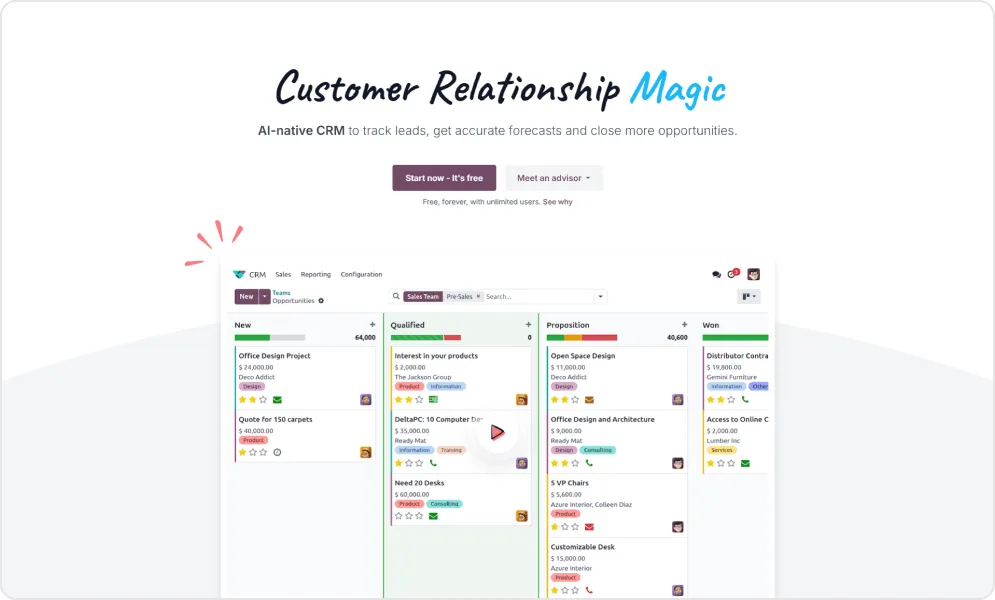
Free and open source: Odoo Community only. Odoo Community is free, licensed under LGPLv3, and you host it yourself; it includes the CRM app, with Sales, Invoicing, Inventory, Manufacturing, eCommerce and Email Marketing, but not Studio, Helpdesk or the full Accounting app (Odoo’s code on GitHub, read Nov 11, 2026). Odoo Enterprise, which every paid plan runs (Odoo Online, Odoo.sh or your own servers), is not open source, and nor is the One App Free plan, which runs on Odoo Online: free of charge, but Enterprise.
Odoo is a business suite with apps for CRM, invoicing, accounting, inventory, eCommerce, HR and manufacturing.
Why Teams Pick Odoo
What works:
- One system for sales, quotes, invoices, accounting and stock, so data flows without re-entry
- A visual pipeline with drag-and-drop stages and activity scheduling
- Start with CRM and add apps as you grow
- A large partner network and a major release every year (Odoo 20 in September 2026)
What’s missing:
- On Odoo’s paid plans, Studio, the external API and multi-company need Custom, not Standard (the One App Free plan allows several companies, and Studio can be its one app)
- Setup and customization take time, and complex workflows need a developer
- The interface can feel heavy when you use only a small part of it
Pricing of Odoo
| Plan | Price (CAD, per user a month) | What you get |
|---|---|---|
| Community (self-hosted) | Free | The open-source edition |
| One App Free | Free | One app, unlimited users, on Odoo Online |
| Standard | CAD 44.00 billed yearly, CAD 55.00 monthly | All apps on Odoo Online |
| Custom | CAD 73.00 billed yearly, CAD 91.90 monthly | Adds Studio, external API, multi-company, Odoo.sh or on-premise |
From Odoo’s pricing page, checked Nov 10, 2026; it showed Canadian dollars to us. Odoo also gives a first-year discount, "valid for 12 months, for initial users ordered": we saw Standard at CAD 35.20 a user a month billed yearly in the first year.
Self-Hosting Odoo
Odoo Community runs on Python and PostgreSQL, on your own server or with a hosting partner. Moving to Enterprise later means a paid plan, so check which apps you need before you start.
When to Choose Odoo
Choose Odoo when the CRM must share data with invoicing, accounting and stock. If you need only a CRM, Twenty, SuiteCRM or EspoCRM keep the system smaller.
4. ERPNext — Best for manufacturing and distribution
Free and open source: yes. ERPNext is licensed under GPLv3 and free to self-host; Frappe Cloud charges for hosting, not for the software.
ERPNext, made by Frappe, is a full ERP, and Frappe says 30,000+ companies have adopted it (ERPNext’s page). It covers accounting, buying, selling, CRM, stock, manufacturing, projects, assets, point of sale and support in one system. For only the CRM, see Frappe CRM under “Also looked at”.
Why Teams Pick ERPNext
What works:
-
A closed sale can flow into stock, production orders, invoices and delivery without re-entry
-
CRM with leads, opportunities and quotations, tied to the rest of the ERP
-
Manufacturing with multi-level bills of materials, work orders, job cards and subcontracting
-
A no-code builder for custom forms, fields and workflows
-
Very active: a new major version (16) in January 2026 and releases every week
What’s missing:
- Its CRM is not as deep as a dedicated CRM’s
- The wide feature set takes time to learn, and setup often needs a partner
- Heavy customizations need testing at every upgrade
- HR and payroll are a separate app, Frappe HR
Pricing of ERPNext
| Option | Price (USD) | Notes |
|---|---|---|
| Self-hosted | Free | You run the servers |
| Frappe Cloud sites | From $5/month | One site on shared servers |
| Frappe Cloud servers | From $40/month | A whole virtual machine for several sites |
From Frappe Cloud’s pricing page, checked Nov 10, 2026. Prices are per site or server, not per user; the page does not say which size a production ERPNext needs, so size it with your data and users. Frappe’s product warranty covers bug fixes, not functional support.
When to Choose ERPNext
Choose ERPNext when you make, stock or ship products and want sales and operations in one system. If you need only a CRM, look at Frappe CRM, Twenty or EspoCRM instead.
5. EspoCRM — Best for small teams on a budget
Free and open source: yes, the core. EspoCRM’s core is licensed under AGPLv3 and free to self-host; its Advanced Pack and Sales Pack add-ons are paid, and included in every cloud plan.
EspoCRM is a lightweight CRM that runs on a modest PHP server or in EspoCRM’s cloud; its core adds a knowledge base to the CRM basics (EspoCRM’s features).
Why Teams Pick EspoCRM
What works:
- A simple interface non-technical users pick up quickly
- Custom entities, fields, relationships and layouts without a developer (its Entity Manager)
- Mass email, campaigns, cases and a customer portal in the free core
- Active: version 10 in July 2026 and 10.1.1 on November 10, 2026
What’s missing:
- Self-hosted, workflows, reports and business process management are the Advanced Pack add-on (we could not see its price), and products, quotes and invoices the Sales Pack; no accounting in any edition
- A smaller community than SuiteCRM’s or Odoo’s
- The Basic cloud plan stops at 100,000 records
Pricing of EspoCRM
| Plan | Price (per user a month) | Minimum users | Storage and records |
|---|---|---|---|
| Self-hosted | Free (add-ons paid) | None | Your server |
| Basic | $15 | 3 | 3 GB per user, 100,000 records |
| Enterprise | $25 | 5 | 10 GB per user, 10,000,000 records |
| Ultimate | $69 | 10 | 400 GB in total, unlimited records, a private server |
From EspoCRM’s pricing page, checked Nov 10, 2026. Basic and Enterprise are billed for 6 months or a year.
When to Choose EspoCRM
Choose EspoCRM when a small team wants a simple CRM with automation, either self-hosted with its add-ons or in its cloud from $15 a user. Teams that need invoicing and accounting together should look at Dolibarr or Odoo.
6. Dolibarr — Best for freelancers and small firms
Free and open source: yes. Dolibarr is licensed under GPLv3 and free to self-host; DoliCloud is its paid hosting.
Dolibarr is a modular ERP and CRM. You switch on only the modules you need: prospects and customers, proposals, orders, contracts, invoicing, bank reconciliation, double-entry accounting, stock, manufacturing, point of sale, projects, timesheets, expense reports and leave, emailing and tickets (Dolibarr’s website). It runs on Windows, Mac, Linux or Docker, or as a hosted service.
Why Teams Pick Dolibarr
What works:
- Quotes, orders, invoices and payments in the same system as the CRM
- Switch modules on one by one, so it stays lean
- Light enough for a small server
- Very active: version 23 in March 2026 and 24 in August
What’s missing:
- In our view the interface looks plain and dated
- Much of Dolibarr’s community help is in French (in our experience)
- Our feature reading found no workflow builder named on Dolibarr’s feature list
- In our view, large or fast-growing teams may outgrow it
Pricing of Dolibarr
| Option | Price (EUR) | Notes |
|---|---|---|
| Self-hosted | Free | You run the server |
| DoliCloud Basic | €14/user/month | 4 GB storage, 250 emails a day, community support |
| DoliCloud Premium | €30/month + €15/user/month | 20 GB, priority and functional support by ticket |
From DoliCloud’s pricing page, checked Nov 10, 2026. Both plans have a free trial of 30 days or more (DoliCloud says no card is needed); prices are before tax, and DoliCloud charges no VAT outside Europe, and none to European companies with a VAT number, except in France.
When to Choose Dolibarr
Choose Dolibarr when a freelancer or small firm wants CRM, quotes and invoices in one lean system. If you want a more modern CRM interface, Twenty or EspoCRM fit better; Dolibarr also has an API.
7. Corteza — Best for building your own CRM
Free and open source: yes. Corteza is licensed under Apache 2.0, the most permissive license here, and free to self-host with Docker.
Corteza is a low-code platform. Instead of a fixed CRM, it gives you the parts to build one, starting from the Corteza CRM app in its library: data modules, visual workflows, a REST API and Docker deployment. Planet Crust maintains it and is its main contributor; the Commons Conservancy owns the project (Corteza’s website).
Why Teams Pick Corteza
What works:
-
Shape the data model and screens to processes that do not fit a standard CRM
-
Visual workflows and a REST API
-
Still maintained: version 2026.9, a security release, on October 19, 2026
What’s missing:
- A small community, and fewer ready-made features than the other six
- The interface is less polished than a dedicated CRM’s
- Building it to fit takes design and configuration time
- No published hosting price: Planet Crust’s pricing page now sells a different platform
Pricing of Corteza
| Option | Price | Notes |
|---|---|---|
| Self-hosted | Free | Docker, on your own servers |
| Hosted or supported | On request | Ask Planet Crust |
From Corteza’s website, checked Nov 10, 2026.
When to Choose Corteza
Choose Corteza when no ready-made CRM fits and you have the time, or a partner, to build one. Most teams leaving Salesforce will be served faster by one of the six above.
What Moving Off Salesforce Takes
Leaving Salesforce is a project, not an export. This is what it involves, whichever CRM you pick:
| Step | What happens |
|---|---|
| 1. Audit | List objects, record counts, fields in use, flows, integrations and users |
| 2. Export | Salesforce’s Data Export Service produces CSV files of your records |
| 3. Map | Match each Salesforce field to a field in the new CRM |
| 4. Build the data model | Create custom objects and fields in the new CRM first (some CRMs import records but not fields from CSV) |
| 5. Load and link | Load accounts, then contacts, deals and activities, keeping their links |
| 6. Rebuild | Recreate flows, reports, dashboards and permissions |
| 7. Test and switch | Check a sample, run both side by side, then switch over |
What moves:
- Accounts, contacts, leads and opportunities
- Custom objects and fields, once they exist in the new CRM
- Lookups between records, record owners, notes, tasks and events
- Chatter posts and comments (Salesforce exports the first 1,000 characters of each)
What is rebuilt:
- Flows, Process Builder and workflow rules
- Reports, dashboards and list views
- Profiles and permission sets
- AppExchange packages: replaced by an equivalent, or dropped
What cannot move:
- Formula and roll-up summary fields: Salesforce leaves them out of exports, so they are recreated
- Apex code and Visualforce pages: redesigned as workflows or an app on the new CRM’s API
- Records in the Recycle Bin: not in the weekly or monthly export
These lists come from our Salesforce to Twenty CRM migration page, which cites Salesforce’s documents; the export side applies whichever CRM you move to. See also how to export Salesforce data, or Salesforce to monday.com for teams that want monday CRM instead.
How long it takes depends on data volume, custom objects, how much logic lives in flows and Apex, integrations and your team’s time for checks, so set dates after the audit; a heavily customized org is often moved in phases.
We’re based in Canada · Working with clients across North America and Europe
Planning your move off Salesforce?
We map your Salesforce data, show what moves, what we rebuild and what cannot move, and send a fixed quote before any work starts. Book a free 30-minute call.
- Certified monday.com Partner
- Free 30-minute call
- Reply within 2 business days
- We sign an NDA
What Your Team Pays a Year
Set your team size: Salesforce’s Pro Suite and Core beside the two open-source clouds that price per user in US dollars. Set-up, migration, training and your own staff time come on top for every option, open source or not.
What Salesforce costs for your team
Billed yearly: Salesforce publishes no monthly price
Salesforce Pro Suite
$2,500.00 a month
$30,000.00 a year
$100.00 per user per month
Salesforce Core
$4,875.00 a month
$58,500.00 a year
$195.00 per user per month
EspoCRM Basic
$375.00 a month
$4,500.00 a year
$15.00 per user per month
EspoCRM Basic is sold from 3 seats.
25 people: 25 seats.
| People | Salesforce Pro Suite, a month | Salesforce Core, a month | Twenty Cloud Pro, a month | Twenty Organization, a month | EspoCRM Basic, a month |
|---|---|---|---|---|---|
| 5 | $500.00 | $975.00 | $45.00 | $195.00 | $75.00 |
| 10 | $1,000.00 | $1,950.00 | $90.00 | $390.00 | $150.00 |
| 25 | $2,500.00 | $4,875.00 | $225.00 | $975.00 | $375.00 |
| 50 | $5,000.00 | $9,750.00 | $450.00 | $1,950.00 | $750.00 |
| 100 | $10,000.00 | $19,500.00 | $900.00 | $3,900.00 | $1,500.00 |
Salesforce’s page shows USD; Twenty’s and EspoCRM’s show “$” with no currency code. Billed yearly, before tax, checked Nov 11, 2026. Confirm on Salesforce’s pricing page.
The options that price in other currencies or not per user, a year, from each pricing page (checked Nov 10, 2026):
| Option | 10 users | 25 users | 50 users | What else you pay |
|---|---|---|---|---|
| Odoo Standard (CAD 44) | CAD 5,280 | CAD 13,200 | CAD 26,400 | In the first year, with Odoo’s discount: CAD 4,224, CAD 10,560 and CAD 21,120; Custom is CAD 43,800 for 50 |
| DoliCloud Basic (€14) | €1,680 | €4,200 | €8,400 | Premium (€30 a month plus €15 a user): €2,160, €4,860 and €9,360 |
| EspoCRM Cloud Enterprise ($25, minimum 5) | $3,000 | $7,500 | $15,000 | Basic stops at 100,000 records |
| SuiteCRM managed hosting | From £1,560 | From £1,560 | From £1,560 | Hosting and Standard Support, not priced per user; Quick Start setup from £2,520 once |
| ERPNext on Frappe Cloud | From $60 (a site) | From $60 | From $60 | Not priced per user: $480 for a whole server; size depends on your use |
| Any of the seven, self-hosted (open-source edition) | $0 in licenses | $0 | $0 | Your server and the people who run it; Twenty’s enterprise features and Odoo Enterprise are paid |
Currencies are as each page showed them, before tax. Self-hosting has no license fee, but it is not free: budget a server, monitoring and someone who owns upgrades and backups, or a partner who does. It also puts the data wherever your server is, the simplest way to keep it in Canada or the EU.
Frequently Asked Questions
Is open source CRM really free?
The software is free to download and run, but running it is not: you pay for hosting, setup, migration, customization and support, or for the vendor’s cloud plan. Those costs replace per-user licenses, which on Salesforce Core are $195 per user a month: see what your team pays a year, with Salesforce and each option side by side.
Which open source CRM is closest to Salesforce?
SuiteCRM has the widest set of built-in CRM modules (sales, marketing campaigns, quotes, contracts and cases) and record types named like Salesforce’s. Twenty is the closest in spirit to a modern cloud CRM, with custom objects and APIs, but it has fewer built-in features. None of the seven matches AppExchange or Salesforce’s industry clouds.
Can I move my Salesforce data to an open source CRM?
Yes. Records come out as CSV files through Salesforce’s Data Export Service and load into the new CRM, with custom objects and fields created first. Formula fields and Apex code cannot move, and flows, reports and permissions are rebuilt. How long it takes depends on your data and customization, so plan it after an audit. See what moving off Salesforce takes.
Do I need technical staff to run an open source CRM?
Not to run the servers: Twenty, EspoCRM, DoliCloud, Odoo Online, Frappe Cloud and SuiteCRM’s managed hosting run them for you, though setting up Odoo or ERPNext often needs a partner. To self-host, someone must own the server, upgrades, backups and security, on your team or at a partner. Customizations beyond settings, such as code on Twenty’s API or new SuiteCRM modules, need a developer.
Is a self-hosted CRM good for GDPR or HIPAA?
Self-hosting lets you choose where the data lives and who can reach it, which helps with GDPR and data residency. It also makes you responsible for security: patches, encryption, access control, backups and audit logs. No open-source license makes you compliant by itself; HIPAA needs your own safeguards and agreements with any host.
How much does moving off Salesforce cost?
It depends on data volume, custom objects, automation and integrations, so get a scoped quote after a data audit. Compare that one-time cost with what you pay Salesforce each year (what your team pays a year). TaskRhino sends a fixed quote with the list of what moves, what we rebuild and what cannot move.
Is Twenty CRM ready for complex sales processes?
It depends on your process. Twenty has custom objects and fields, pipelines, workflows, AI agents and REST and GraphQL APIs, and its source code can be changed. Its limits: reporting is lighter than Salesforce’s, there is no official mobile app, and SSO and row-level permissions start on its $39 Organization plan. Test it with a sample of your own pipeline before you decide; our Twenty CRM review lists both sides.
Final Verdict: Which Open Source CRM Should Replace Salesforce?
Choose open source if:
- Per-seat licenses are your biggest CRM cost, and you use a fraction of Salesforce
- You want your customer data on servers you choose
- Your team or a partner can run a server, or a vendor cloud plan will do
Skip open source if:
- You rely on AppExchange apps, CPQ or industry clouds
- Your sales process lives in Apex code that would cost more to redesign than the licenses you would save
- No one can own upgrades, backups and security
The bottom line: Twenty is our pick for teams leaving Salesforce that want a modern, API-first CRM they can host themselves; SuiteCRM, Odoo and ERPNext win when you need more built in.
Our recommendation: Shortlist two, load a sample of your own Salesforce data into each, and run one real sales week in them before you decide. Budget for hosting, migration and support before you compare license prices.
Need Help Leaving Salesforce?
We’ve helped 110+ clients choose and set up their business software.
How We Compared These CRMs
How we compared these CRMs:
- Licenses, releases and activity from each project’s GitHub repository, prices from each pricing page and features from each project’s own pages, read November 10, 2026; on November 11 we read Twenty’s, EspoCRM’s, Odoo’s and Salesforce’s pricing pages again, Odoo’s code and the three projects under “Also looked at”
- We could not read G2, Capterra or Product Hunt, so no review-site ratings are quoted; EspoCRM’s add-on prices and Corteza’s hosting price were not published where we looked
- No test installs were run. The order is not a score: Twenty is first because it is the modern, API-first option and the one we implement (see the disclosure at the top); pick by the “Which one fits” table, not by rank
How active each project is, from GitHub on November 10, 2026:
| Project | GitHub stars | Code changes on the main branch, Aug 10 to Nov 10, 2026 |
|---|---|---|
| Twenty | 60.7k | 4,015 |
| Odoo | 55.7k | 4,729 |
| ERPNext | 41.2k | 6,117 |
| Dolibarr | 7.8k | 5,814 |
| SuiteCRM | 5.9k | 30 (8.x core only) |
| EspoCRM | 3.6k | 483 |
| Corteza | 2.2k | 258 |
Stars measure developers’ interest, not customers’ (Odoo’s and ERPNext’s count a whole ERP), and code changes are a sign of activity, not quality.
Leaving Salesforce for open source?
Read next