Merge monday.com accounts by moving one into the other
monday.com cannot merge two accounts. You move one into the other. Decide which one stays, and what comes across.
monday.com's own help article says it too: "you cannot merge two accounts entirely" (read 19 Nov 2026). TaskRhino, a certified monday.com partner, plans the move of one account into the other and runs it with RhinoMove, its own tool for moving, merging and splitting accounts, with a signed integrity report at the end. Start with which account stays.
New boards in the kept account. Same-name boards appear twice unless excluded or renamed.
Tap to choose
Which account stays?
Six taps, about a minute. monday.com has no merge button, so one account is kept and the other is moved into it. Every line is tied to monday.com's own page and the date it was read.
How each answer is decided (sources)
Each answer to the questions above and what it means
Question
If you answer
What it means
Weight
Are both accounts in the same data region?
No, different
Different regions. monday.com's own copier does not copy between US and EU region servers (monday.com support, read 19 Nov 2026), so this is a region move, not a merge. Read the page for your regions first.
Other move
Are both accounts in the same data region?
Not sure
Find out first. The region is under Administration, General, Profile, in the line "Your data is stored in" (monday.com support, read 19 Nov 2026). Everything below assumes the same region.
Settle this
Which account is on the higher plan?
Account A
Account A is on the higher plan. Plans differ in what they list: private boards from the Pro plan (monday.com pricing page, read 19 Nov 2026) and a daily API call limit of 1,000 on Standard against 10,000 on Pro (monday.com developer documentation, read 19 Nov 2026).
Fine
Which account is on the higher plan?
Account B
Account B is on the higher plan. Plans differ in what they list: private boards from the Pro plan (monday.com pricing page, read 19 Nov 2026) and a daily API call limit of 1,000 on Standard against 10,000 on Pro (monday.com developer documentation, read 19 Nov 2026).
Fine
Which account is on the higher plan?
The same
Both accounts are on the same plan, so the plan does not decide which one stays.
Fine
Which account is on the higher plan?
Not sure
Look up each plan first. The plan sets what the boards you bring can use: private boards, guest access and the daily API call limit (monday.com pricing page and developer documentation, read 19 Nov 2026).
Settle this
Which account has more private boards?
Account A
Account A holds more private boards. monday.com's own copier does not transfer private boards (monday.com support, read 19 Nov 2026), so the account that already holds them is the easier one to keep.
Fine
Which account has more private boards?
Account B
Account B holds more private boards. monday.com's own copier does not transfer private boards (monday.com support, read 19 Nov 2026), so the account that already holds them is the easier one to keep.
Fine
Which account has more private boards?
Not sure
Count the private boards on each side before you choose. Name them in the call: they are the part of a merge that most often changes the answer.
Settle this
Which account has more integrations, apps and webhooks to reconnect?
Account A
Account A carries more integrations and apps. Keep it: every integration that moves has to be re-authenticated, and monday.com's copier does not carry automations that include integrations (monday.com support, read 19 Nov 2026).
Fine
Which account has more integrations, apps and webhooks to reconnect?
Account B
Account B carries more integrations and apps. Keep it: every integration that moves has to be re-authenticated, and monday.com's copier does not carry automations that include integrations (monday.com support, read 19 Nov 2026).
Fine
Which account has more integrations, apps and webhooks to reconnect?
Not sure
List the integrations, apps and webhooks of both accounts. Each one on the side that is moved has to be reconnected, and automations are listed for rebuild.
Settle this
Do most people use the same email in both accounts?
Yes, most
Most people share an email, so most matches are automatic. RhinoMove matches people by email, and for company mergers also by the name before the @ when exactly one person matches.
Fine
Do most people use the same email in both accounts?
No, many differ
Many people use different emails. RhinoMove's people map is matched by email, or by the name before the @ when exactly one person matches; every other person is a decision in the people map, and two different emails are two different people.
Settle this
Do most people use the same email in both accounts?
Not sure
Check a sample of names on both sides. The same email can sit in two accounts (monday.com support, read 19 Nov 2026), so a mix is normal and the people map shows what is left.
Settle this
Is one person admin on both accounts with the same email?
No
Agree who will be admin on both accounts with the same email. That is monday.com's own condition for its copier (monday.com support, read 19 Nov 2026), and the first thing to settle for any move.
Settle this
Is one person admin on both accounts with the same email?
Not sure
Find out who is admin on each account, and with which email. monday.com's own copier needs one person who is admin on both with the same email (monday.com support, read 19 Nov 2026).
Settle this
Sources: monday.com support (the switch-accounts, copy-boards and data-residency articles), monday.com developer documentation (rate limits) and the monday.com pricing page. Checked 19 Nov 2026.
Why there is no merge button
"For security reasons, you cannot merge two accounts entirely. However, you can duplicate your boards and dashboards one by one and transfer them to another account."
"Copying between accounts is helpful if you accidentally opened multiple accounts and want to consolidate, or if you work with several teams and need to move information to the right place."
Plans also differ in what the boards can use. monday.com's developer documentation (read 19 Nov 2026) gives a daily API call limit of 1,000 on Standard and 10,000 on Pro, and its pricing page lists private boards from the Pro plan. See monday.com plans compared before you choose, and the copier check if one folder of boards is all you need to move.
The order of work when one account moves into the other
Seven steps, in order. Some are yours, some are ours. The how it runs page shows each RhinoMove screen: how RhinoMove runs a move.
01
Decide which account stays
You do
Use the chooser above. Name who is admin on both accounts.
You get: Settle the direction and the owner of the move.
02
Invite the people first
You do
monday.com carries assignees, subscribers and updates only for people who are already in the destination account with the same email (monday.com support, read 19 Nov 2026).
You get: A list of who is missing from the kept account.
03
Map the boards
We do
We scan both accounts and map each board, column and group. Boards you leave out are excluded; boards with the same name are renamed or excluded here.
You get: A mapping you can preview on sample items.
04
Test run
We do
A test run comes first, so you can check the result before the full move.
You get: A test-run result.
05
Full move
We do
Changes carried over: items, subitems, comments, files and deletes made until go-live, plus a final catch-up. Doc edits are flagged, not synced; columns, groups or boards created after the scan are not carried.
You get: Changes made until go-live are carried; the rest is listed.
06
Catch-up and count
We do
Counts: from RhinoMove's own map of every copied object (a full recount of both accounts is a command-line tool, not a screen).
You get: A signed integrity report.
07
Close the old account
You do
Closing or downgrading the old account is your own step, when you decide. Nothing in our process needs it closed.
You get: An old account you can keep as long as you like.
Read this before step 3:the kept account gets new boards (or merged boards). Boards with the same name appear twice unless excluded or renamed. Items already in the kept account are not de-duplicated.
People after a merger: who matches whom
People decisions live here. RhinoMove's own wording, as checked against its code:
RhinoMove, people
People matched by email: case-insensitive, active non-guest users only; guests are listed for re-invite; the people map can be edited. For company mergers there is an option to match by the part before the @ (a.b@old to a.b@new), only when exactly one person matches.
In plain words: people are matched by email, or by the name before the @ when exactly one person matches.
How people are matched when one account moves into the other
Case
What happens
What you decide
Same email in both accounts
Matched.
Nothing, unless you want to change the match in the people map.
Different email, same name before the @, one match
Matched, as a company-merger option.
Check the match; edit the map if it is wrong.
Same name before the @, more than one match
Not matched: the option works only when exactly one person matches.
Pick the right person in the people map.
A guest
Listed for re-invite.
Who re-invites them, and into which account.
Nobody matches
Listed in the people map, which can be edited.
What you enter in the people map for them.
Source: RhinoMove user matching, checked against its code on 19 Nov 2026 (what RhinoMove is).
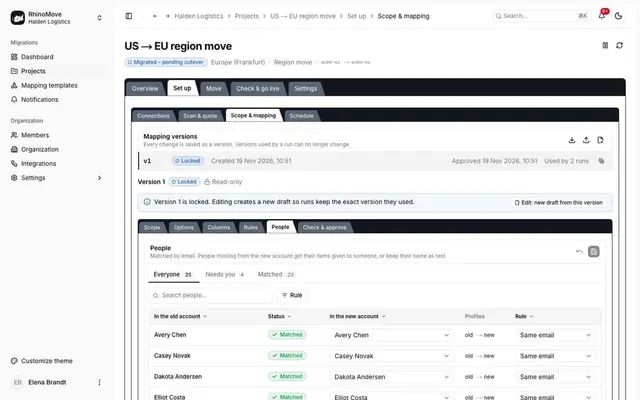
The people map: each person matched by email, editable. Demo data.
Two boards doing one job
RhinoMove, merge
Combine several monday.com accounts or boards into one: RhinoMove can merge boards with the same structure into a single board (matching columns and groups by name, with a column showing where each item came from) and place them into workspaces that already exist in the new account.
Before
Leads (account A)NameStatus
Leads (account B)NameStatus
→
After
LeadsNameStatusCame from
Example, labelled: two boards with the same structure become one, and a column shows where each item came from.
Three things stay as they are. Boards with the same name appear twice unless excluded or renamed. Items already in the kept account are not de-duplicated. A column type that clashes needs a human pick before the mapping can be approved.
Records can be restructured while moving: 13 kinds of mapping rule (rename, merge, split, change a column's type, remap people and more). You can preview the result on sample items, and every mapping is checked before it can be approved. RhinoMove's merge of two boards into one board, with a column showing where each item came from, was tested end to end on a monday.com API simulator. See how a run is built on the RhinoMove page.
Two kinds of duplicates
Our job
A re-run is built not to copy twice
Built not to create the same record twice. In four failure tests on a monday.com API simulator (network cut, worker stopped mid-call, lost responses, pause and restart) each run ended in an exact copy, and a second run of the same scope created nothing new.
Your decision
A customer who exists in both accounts
A company that sits in both accounts stays two records: items already in the kept account are not de-duplicated. Merging them is your own step in monday.com after the move.
The full list of what monday.com's own copier leaves behind is on what the Cross Account Copier leaves behind, and it is not repeated here. For RhinoMove, automations are listed for rebuild, and the rest of what cannot move is listed too.
RhinoMove, what it lists
Accounts for 41 documented monday.com API limits and quirks, from daily call limits to file links that expire after an hour. Where monday.com's API cannot do something, RhinoMove lists it in the report instead of failing quietly.
How you show it all arrived
RhinoMove, the report
Each move ends with a signed integrity report, and when your data is deleted you get a signed deletion certificate. Both carry a digital signature (Ed25519) that anyone can check against RhinoMove's public key.
Your size-check answers are already in the message. Change anything you like.
Questions people ask about merging monday.com accounts
Direct answers with sources and read dates. General information, not legal advice. Security terms by plan: monday.com security and compliance.
Can monday.com merge two accounts?
No: monday.com says you cannot merge two accounts entirely, and you move boards and dashboards one by one into another account instead (monday.com support, read 19 Nov 2026).
Which monday.com account should I keep after an acquisition?
Keep the account that holds the most you cannot easily rebuild: private boards, integrations and the plan you need. The chooser above weighs these, and the call settles the rest.
Can I keep both accounts and switch between them?
Yes: monday.com lets you keep many accounts and switch between them, and one email can serve several (monday.com support, read 19 Nov 2026).
Will people match if their emails changed?
RhinoMove matches people by email, or by the name before the @ when exactly one person matches. Everyone else is a decision in the people map, and two different emails are two different people.
What happens to two boards that do the same job?
RhinoMove can merge boards with the same structure into a single board, with a column showing where each item came from. Boards with the same name appear twice unless excluded or renamed.
Do we pay for two accounts during the move?
Ask monday.com: billing is between you and monday.com, and this page publishes no price. Both accounts exist until you close the old one, which is your own step.
When do I close the old account?
When you decide, after you have the signed integrity report. RhinoMove reads the old account and adds only a temporary webhook, which it removes at go-live, so you can keep the old account as long as you like.
Can the same email be used in both accounts?
Yes: monday.com says "Yes, absolutely you can!" (monday.com support, read 19 Nov 2026).