The Detailed Twenty CRM Review: Features and limitations

The CRM landscape is defined by a tension between bloated enterprise platforms and oversimplified tools that leave growing teams stranded. Into this gap steps Twenty CRM, an open-source alternative that has captured attention from developers, startups, and organizations frustrated with traditional options like Salesforce and HubSpot.
This Twenty CRM review examines whether this modern CRM delivers on its promise of flexibility without complexity. With nearly 60,000 GitHub stars and backing from Y Combinator, Twenty.com has established itself as a credible contender in the open-source CRM space.
But does the platform hold up under real business demands, or does it fall short where it matters most?
If you're evaluating Salesforce alternatives or any other platforms, prioritize data ownership, customization control, and a clean user experience, Twenty deserves a serious look.
In this guide, you will learn how to understand Twenty CRM, what it offers, where it excels, and where it falls short. By the end, you will be able to make an informed decision whether to implement Twenty CRM services for your business.
Understanding Twenty CRM: The Open-Source Response to CRM Frustration
Twenty is a modern CRM built from the ground up as an open-source alternative to legacy platforms. Licensed under AGPLv3, it was created in response to a clear market gap: traditional CRMs are expensive, restrictive, and increasingly dependent on vendor lock-in to justify rising prices.
Instead of replicating Salesforce’s feature sprawl, the founding team took inspiration from modern tools like Notion, Airtable, and Linear. The result is a developer-first CRM that emphasizes usability, extensibility, and full data ownership.
What sets Twenty apart
- Open-source by design under AGPLv3, with no per-user licensing fees
- Clean, modern UI that feels intuitive for non-technical users
- API-first architecture built for customization and integrations
- Cloud-hosted and fully self-hosted deployment options
- Complete data ownership for teams with compliance or sovereignty needs
Twenty supports both managed cloud hosting and self-hosted deployments. Organizations that self-host retain full control over where customer data lives, making the platform especially attractive for regulated industries, privacy-focused teams, and companies avoiding vendor dependency.
The project has grown rapidly since launch, with hundreds of contributors on GitHub. Its roadmap is shaped through open discussions and community input, positioning Twenty as one of the most transparent and collaborative CRM platforms available today.
With this foundation in place, the question becomes: what can Twenty actually do for your business?
Key Twenty CRM Features That Matter for daily operations
Understanding Twenty CRM features requires looking beyond checkbox comparisons. The platform focuses on doing fundamental CRM tasks well rather than accumulating features for marketing purposes.
- Contact and company management: Twenty centralizes people and company records with structured profiles, linked activities, notes, tasks, and deal history. Teams get a unified view of relationships without duplicating data across multiple objects.
- Custom objects and custom fields: You can create custom objects such as invoices, properties, subscriptions, or internal entities that match your business model. Custom fields extend every object, allowing you to capture only the data you actually need.
- Sales pipeline visualization: Deals move through customizable pipeline stages using a visual, drag-and-drop interface. This helps sales teams track progress, identify bottlenecks, and prioritize active opportunities quickly.
- Kanban table views: Users can switch between Kanban boards for workflow visibility and table views for fast editing and bulk updates. This flexibility supports both visual sales tracking and data-heavy operations.
- Email integration: Twenty syncs email with Google and Microsoft accounts. Emails are automatically logged against related contacts, companies, and deals to maintain a complete communication history.
- Calendar synchronization: Google and Microsoft calendars sync into the CRM to track meetings and events. Scheduled interactions appear in activity timelines, keeping customer context intact.
- Workflow automation: Built-in automation allows teams to trigger actions based on record changes or pipeline movement. This covers common scenarios like task creation, notifications, and follow-ups without requiring complex flow builders.
- AI assistant and AI agents: Twenty includes AI capabilities (AI Chat since release 1.17 in February 2026; AI agents and an MCP server since v2.0 in April 2026) focused on productivity, such as drafting content, summarizing records, and assisting with workflows. These features integrate through a Model Context Protocol (MCP) server and continue to evolve as the platform matures.
- Customizable dashboards and reporting: Dashboards (unlimited on every cloud plan) provide visibility into pipeline health, team activity, and key sales metrics. Reports are configurable to match how teams measure performance rather than forcing predefined KPIs.
- Advanced search and command palette: A global search and command palette (⌘K) lets users instantly find records, fields, notes, and activities. Search works across structured fields and unstructured content like phone numbers and text notes.
- Task and activity tracking: Tasks, calls, and meetings can be scheduled with due dates and ownership assignments. Every activity links directly to the relevant contact, company, or deal for full traceability.
- Role-based permissions: On the Organization plan, Twenty supports custom roles with field-level and row-level permissions; Pro has Admin and Member roles. Administrators can restrict sensitive data while allowing teams to collaborate safely.
- Developer-first APIs: Auto-generated REST and GraphQL APIs expose all objects, including custom ones, as first-class resources. This enables deep customization and seamless integration with internal systems.
- Webhooks: Real-time webhooks notify external systems when data changes occur. This allows instant synchronization with tools like Zapier, Windmill, data warehouses, or internal services.
- Data migration and import tools: Twenty includes CSV import and export on every plan, and its API handles larger imports. Teams can migrate data from spreadsheets or legacy CRMs, though relationships need careful mapping.
- Record merge and deduplication: Built-in merge tools help identify and combine duplicate records while preserving historical data and relationships. This keeps datasets clean as the CRM scales.
- Workspaces: This feature allows teams, regions, or business units to operate in isolated environments. Each workspace can have its own pipelines, lists, and permissions.
- Note-taking and collaboration: Notes can be created directly on any record and shared across teams. This keeps internal context centralized and reduces reliance on external documentation tools.
- Self-hosting and data ownership: Organizations can deploy Twenty on their own infrastructure or private cloud. This ensures full control over data residency, compliance, and security policies.
- Two-factor authentication (2FA): Twenty supports two-factor authentication using common authenticator apps like Authy and 1Password. This adds an additional security layer for workspace access.
Features only matter if they translate into practical value. The next section examines how different organizations put Twenty to work.
How Businesses Actually Use Twenty CRM in Practice
Theory matters less than practice. Here's how different organizations apply Twenty in their operations.
1. Startups and small development teams
Early-stage companies often struggle with CRM costs that scale faster than revenue. Twenty's pricing, starting at $9 per user per month for hosted, provides an affordable entry point. Self-hosting eliminates per-user costs entirely, though it introduces infrastructure and maintenance responsibilities.
Development teams appreciate the clean API design and the ability to customize through code rather than administrative interfaces. A three-person startup can spin up Twenty, connect it to existing tools, and establish consistent customer tracking without enterprise platform overhead.
2. Agencies managing multiple client relationships
Creative and consulting agencies handle numerous client accounts simultaneously. Twenty's custom objects allow agencies to structure data around their workflow, whether tracking projects, deliverables, or retainer agreements alongside standard contact and company records.
Self-hosting appeals to agencies handling sensitive client information, particularly those working with clients in healthcare, finance, or other regulated sectors where data residency matters.
3. Technical teams replacing legacy systems
Organizations looking to escape vendor lock-in find Twenty attractive as a migration target. The open-source licence means no dependency on external product roadmaps or price increases. If the project's direction diverges from your needs, you can fork the codebase.
Twenty supports migrations from Salesforce and HubSpot through CSV import or its API, though migrations require careful data mapping. See how a Salesforce to Twenty migration works. The payoff is reduced licensing costs and greater control over platform evolution.
If your organization fits one of these profiles, exploring Twenty alongside your current shortlist of CRM alternatives is worth the investment of time. However, before committing, you need to understand where Twenty falls short.
Where Twenty CRM Limitations May Affect Your Workflow
No platform suits every organization, and Twenty has meaningful gaps that potential adopters must evaluate honestly.
1. Underdeveloped reporting and analytics feature
Twenty has dashboards, but its reporting remains less developed than mature platforms. HubSpot and Salesforce offer extensive analytics, visualization options, and prebuilt reports for pipeline health, team performance, and forecasting.
Twenty lacks this depth. Organizations with heavy reporting requirements must extract data via APIs and build analytics in external tools like Metabase or Looker. This is manageable for technical teams but adds development time.
2. Not support marketing automation
If your CRM strategy depends on sophisticated multi-channel marketing campaigns, Twenty will disappoint. The platform focuses on sales and relationship management rather than marketing automation.
HubSpot's strength lies in connecting CRM data with email campaigns, social publishing, and advertising. Twenty lacks these capabilities, requiring integration with separate marketing tools rather than providing an all-in-one solution.
3. Still in developing and growing stage
Twenty’s app marketplace is young compared to Salesforce’s AppExchange or HubSpot’s app marketplace. While the API architecture allows custom connections, you'll build more from scratch than you would with established platforms.
This matters most for organizations relying on pre-built integrations to connect CRM data with accounting software, support desks, and other business systems.
4. Limited enterprise-level support and documentation
Twenty’s cloud plans include email and chat support; priority support starts on Organization, and a dedicated SLA comes only with Enterprise (from $50k a year). Self-hosted teams rely on the community, the help centre and documentation, or a partner.
Documentation exists but doesn’t match the comprehensiveness of enterprise platforms. Technical teams comfortable with open-source software will navigate this fine, but organizations expecting white-glove support should factor this into their evaluation.
These limitations become clearer when you examine what actual users say about their experiences.
What Real Users Say: Twenty CRM Reviews from Product Hunt, G2, and Beyond
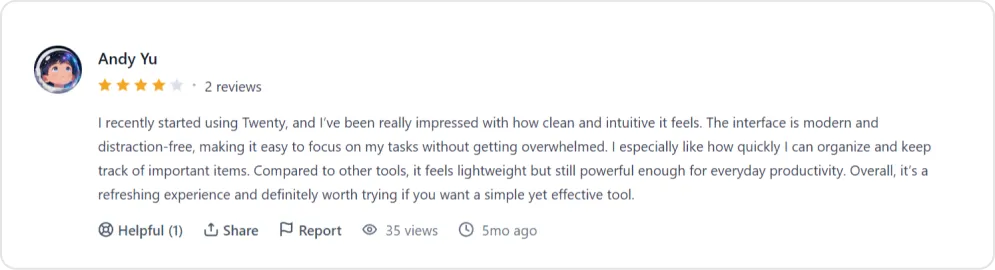
User feedback from multiple platforms reveals consistent themes about Twenty's strengths and weaknesses. Here’s a sample of what users post publicly.
1. Positive user experiences
2. Critical user feedback
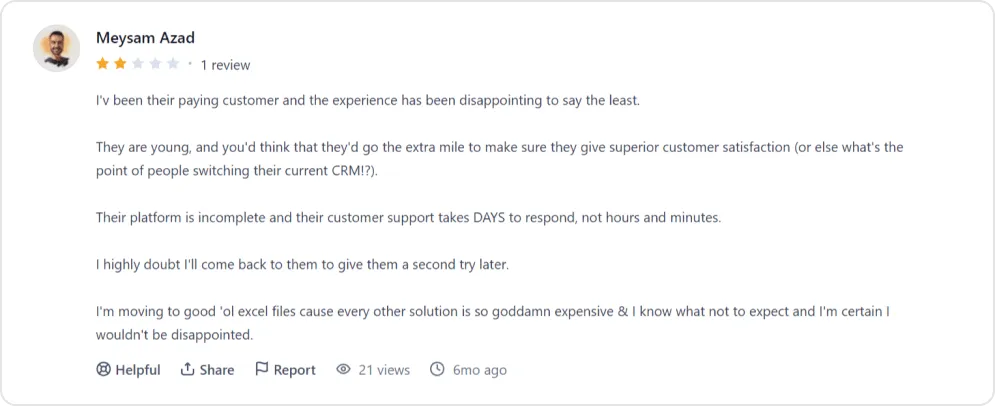
3. Review platform availability
Most user feedback on Twenty comes from Product Hunt, AlternativeTo, SourceForge, and developer communities rather than enterprise review sites. This reflects the platform's current positioning toward technical users rather than mainstream business audiences.
Twenty CRM Vs Salesforce, HubSpot, and Other Alternatives
Evaluating CRM customization options requires context about the competitive landscape. Here is a detailed comparison with each platform:
1. Twenty vs Salesforce
Salesforce dominates the enterprise CRM market with deep customization, an extensive ecosystem, and features covering nearly every sales workflow. Twenty targets organizations that find Salesforce's complexity excessive for their needs. Below offers the detailed comparison between Twenty and Salesforce:
| Criteria | Twenty CRM | Salesforce |
|---|---|---|
| Target audience | Designed for startups, SMBs, and product-led teams that want flexibility, speed, and control without enterprise complexity. | Built primarily for large enterprises and organizations managing complex, multi-layered sales and service operations. |
| Pricing model | Open-source with low-cost cloud or self-hosted options, allowing businesses to scale without heavy licensing overhead. | Per-user licensing model starting relatively low but escalating significantly as features, users, and integrations increase. |
| Total cost of ownership | Predictable and cost-efficient, especially for teams with in-house technical capabilities. | Often high due to licensing tiers, add-ons, consulting services, and long-term platform dependencies. |
| Ease of use | Clean, minimalist, and fast interface focused on productivity and reduced training requirements. | Extremely powerful but often requires onboarding, training, and structured adoption processes. |
| Customization approach | API-first architecture with flexible data models, allowing developers to build tailored workflows and integrations quickly. | Highly customizable but typically requires admin-heavy configuration, specialized tools, and platform-specific expertise. |
| Automation depth | Supports essential automation through integrations and workflow tools, suitable for streamlined sales processes. | Offers highly advanced native automation through Salesforce Flows and enterprise workflow orchestration. |
| Ecosystem and integrations | Growing, developer-driven ecosystem with strong flexibility but fewer ready-made marketplace solutions. | Massive AppExchange marketplace with thousands of pre-built integrations and enterprise extensions. |
| Data ownership and control | Full data control with self-hosting and open infrastructure flexibility. | Vendor-controlled infrastructure with limited data environment flexibility. |
| Administrative overhead | Lightweight and manageable without dedicated CRM administration in most cases. | Typically requires dedicated CRM administrators or specialized support teams. |
| Best suited for | Organizations prioritizing simplicity, developer flexibility, and cost control. | Enterprises needing advanced automation, large-scale integrations, and complex operational management. |
2. Twenty vs HubSpot
HubSpot excels at combining CRM with marketing automation, making it particularly strong for small-to-medium businesses that want an integrated platform. Twenty appeals to teams that don't need HubSpot's marketing capabilities and prefer a cleaner, more focused CRM experience.
| Criteria | Twenty CRM | HubSpot |
|---|---|---|
| Core focus | Built around core CRM functionality, emphasizing flexibility, performance, and developer-driven extensibility. | Combines CRM with marketing, sales, service, and customer engagement automation within a single growth platform. |
| Interface and usability | Minimal, modern, and performance-focused interface designed to reduce distractions and improve productivity. | User-friendly and visually polished but can become cluttered as additional marketing and sales tools are activated. |
| Reporting capabilities | Provides essential sales pipeline tracking and CRM performance analytics suitable for operational visibility. | Offers advanced multi-channel reporting, marketing attribution insights, and revenue forecasting across the customer lifecycle. |
| Pricing approach | Open-source or low-cost cloud deployment keeps costs predictable and scalable as teams grow. | Provides a free CRM entry point but becomes significantly more expensive as premium marketing, automation, and reporting features are added. |
| Performance and speed | Lightweight architecture ensures faster page loads and smoother performance, particularly for product-led and engineering teams. | Performance can become heavier as customer data, automation workflows, and marketing tools expand. |
| Customization flexibility | API-first architecture allows deep customization, custom integrations, and developer-level control over workflows and data models. | Primarily configuration-based customization, which is easier to implement but less flexible for advanced engineering requirements. |
| Vendor lock-in risk | Minimal, since open-source architecture provides full infrastructure and data control. | Higher long-term lock-in as organizations increasingly rely on HubSpot’s integrated marketing, automation, and data ecosystem. |
| Ideal users | Product-led organizations, SaaS companies, and technical teams seeking flexible, scalable CRM infrastructure. | Marketing-driven SMBs looking for an all-in-one platform for lead generation, nurturing, and customer engagement. |
| Trade-off consideration | Offers flexibility and performance but requires external tools for marketing automation and advanced business functions. | Provides extensive built-in capabilities but introduces higher complexity, cost scaling, and platform dependency over time. |
3. Twenty vs other open-source options
Among open-source CRMs, Twenty competes with platforms like Krayin and SuiteCRM. Twenty describes itself as the #1 open source CRM on GitHub, and nearly 60,000 stars back that up. The project’s GitHub traction and community activity suggest stronger momentum than many alternatives.
Organizations specifically seeking an open-source CRM will find Twenty among the most polished options available, though the ecosystem still trails established open-source business platforms. You can check other open source alternatives if you think Twenty CRM is not right for your business.
Feature comparisons only tell part of the story. Understanding the true cost of adoption requires examining Twenty's pricing model in detail.
What Twenty CRM Actually Costs: Pricing Breakdown
Twenty's pricing structure reflects its open-source positioning while offering options for different technical capabilities. Cloud prices below are in USD per user/month, billed yearly, as listed on twenty.com in October 2026; monthly billing costs more.
| Plan | Deployment | Price (USD) | What’s Included | Best For |
|---|---|---|---|---|
| Self-Hosted (AGPLv3) | On-premise / private cloud | $0 | Open-source core, unlimited users, custom objects, APIs | Teams with in-house technical resources |
| Pro (Cloud) | Managed hosting | $9 per user/month | Core CRM, Google and Microsoft email and calendar sync, workflows, AI agents, REST and GraphQL APIs | Startups and SMBs wanting simplicity |
| Organization (Cloud) | Managed hosting | $39 per user/month | Everything in Pro plus custom roles, SAML/OIDC SSO, audit logs, priority support | Growing teams and regulated environments |
| Enterprise | Managed, single-tenant | From $50k/year | Dedicated compute, single-tenant isolation, SCIM, dedicated support and SLA | Large or compliance-driven organizations |
Self-hosted true cost considerations
| Cost Component | What Drives It |
|---|---|
| Server hosting | Your cloud or server provider, and your data volume |
| Server resources | The Twenty services you run (see Twenty’s self-hosting docs) |
| DevOps & maintenance | Updates, backups and monitoring your team takes on |
| Upgrades & monitoring | Internal responsibility |
For a worked setup on AWS, see our guide to self-hosting Twenty on AWS.
Self-hosting removes all per-user licensing fees but shifts responsibility to infrastructure management and ongoing maintenance.
Cost comparison context
| Platform | Entry Price (USD per user/month) | Higher Tiers (USD per user/month) |
|---|---|---|
| Twenty CRM | $0 self-hosted, $9 Pro | $39 Organization; Enterprise from $50k/year |
| Salesforce Sales Cloud | $25 Starter Suite | $100 Pro Suite, $195 Core, $395 Advanced, $550 Max |
| HubSpot | Free plan for up to 2 users | Listed on HubSpot’s pricing page |
Twenty CRM delivers a transparent pricing model with no forced upgrades, add-ons, or ecosystem taxes. For teams willing to trade enterprise bloat for flexibility and ownership, it can keep total cost of ownership low, as long as you can run self-hosting or pay for the cloud plan.
Is Twenty CRM Right for Your Business?
Twenty CRM works best for technically capable teams that value flexibility, data ownership, and clean design over feature overload (for a fuller checklist, see is Twenty CRM right for your business). It fits startups and SMBs looking to avoid expensive licensing and vendor lock-in, especially if you have developers who can manage customization and self-hosting.
Twenty also suits regulated industries where data sovereignty matters, since self-hosting keeps customer data under your control. Teams tired of bloated CRMs will appreciate its focused approach to core workflows.
However, Twenty may not be the best choice if you need advanced reporting, integrated marketing automation, enterprise-grade support, or if your team lacks technical resources.
If you want a smooth transition and real-world results, TaskRhino helps businesses evaluate, migrate to, and implement Twenty CRM. Not sure yet? Our Twenty CRM consultants can review your requirements before you commit.
Ready to Switch From Salesforce to Twenty CRM?
Book a free 30-minute call with TaskRhino to plan your migration to Twenty CRM.
Schedule a Consultation CallFree 30-minute call · No obligation
Frequently Asked Questions
Is Twenty CRM really free?
The self-hosted version is free under the AGPLv3 open-source licence. You can download, deploy, and use Twenty without paying licensing fees. However, you’ll incur costs for server infrastructure, maintenance, and any custom development. The cloud-hosted version starts at $9 per user per month (USD, billed yearly) for the Pro plan.
How does Twenty CRM compare to Salesforce for small businesses?
Twenty offers a dramatically simpler experience at a fraction of Salesforce's cost. While Salesforce provides deeper functionality and a massive integration ecosystem, Twenty delivers core CRM capabilities without the complexity that often overwhelms small teams. For businesses that need basic contact management, deal tracking, and custom objects without enterprise features, Twenty is a viable alternative.
Can non-technical teams use Twenty CRM effectively?
The hosted version requires minimal technical knowledge for basic use. However, extracting maximum value from Twenty—particularly customization, integrations, and self-hosting—requires development resources. Teams without technical capacity should consider whether the learning curve justifies the cost savings compared to more turnkey solutions.
Does Twenty CRM integrate with email and calendar?
Yes. Twenty syncs email and calendar with Google and Microsoft accounts, and emails and meetings are logged against the related records. It doesn’t include email sequences or marketing automation like HubSpot, so for advanced email workflows you’ll need to connect dedicated email tools through the API, webhooks or Zapier.
What are the main reasons companies switch away from Twenty?
Based on the limitations above, the likely reasons are needing built-in reporting and analytics, requiring marketing automation features, wanting a support SLA (only Enterprise includes one), and finding the platform too basic for complex sales processes. A company that outgrows Twenty would typically look at HubSpot or Salesforce.
Is Twenty CRM suitable for enterprise use?
Twenty mainly targets startups and mid-sized businesses, but it now has an Enterprise plan (from $50k a year) with single-tenant isolation, SCIM provisioning, dedicated support with an SLA, and security reviews. The Organization plan adds SSO, audit logs and priority support. Large enterprises should still compare its compliance documentation and ecosystem with Salesforce’s.
Want to Host, Customize, or Migrate to Twenty CRM
More in Twenty CRM



Related posts